



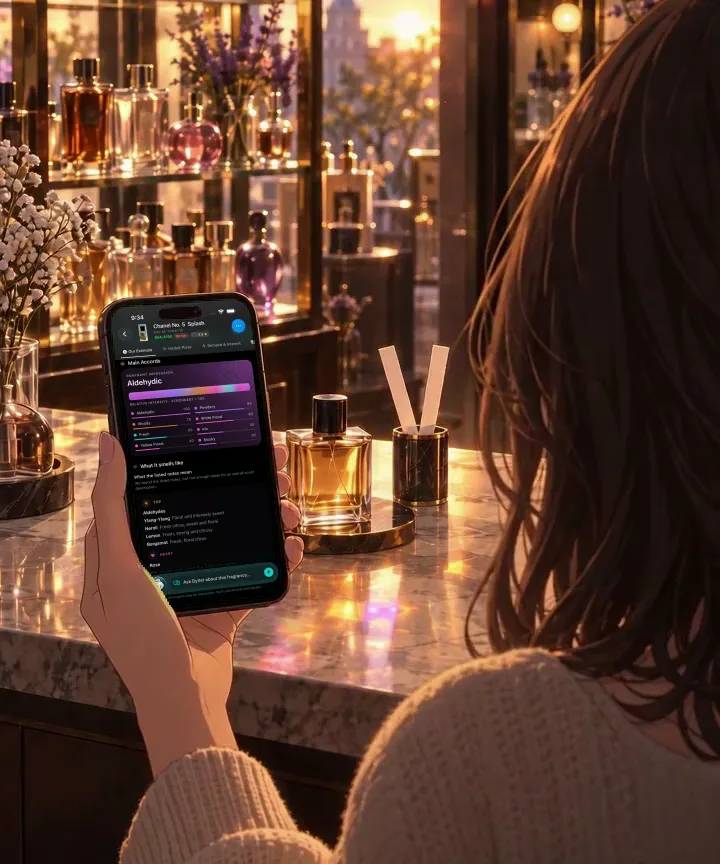







01 / START WITH A PHOTO
Take a photo. Then ask.
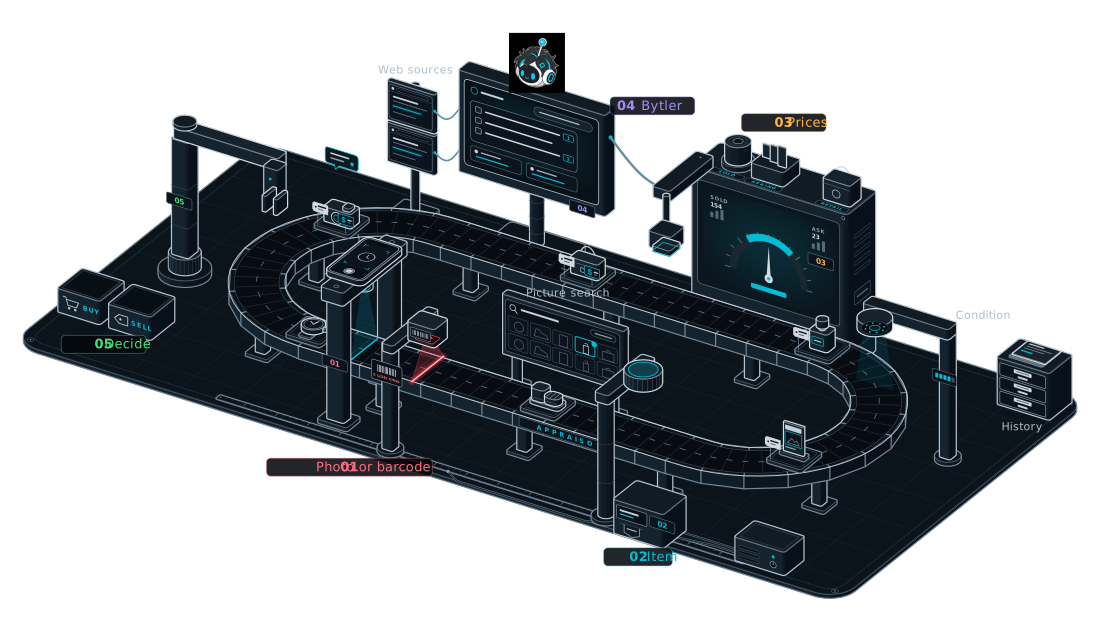
Appraiso identifies your item. Bytler uses the report to answer your questions.
POINT. SCAN. ASK.
Snap a photo for a market-backed price. Then ask Bytler, the item expert built into every report, whether it’s a good buy, what it really sells for, or what to buy instead.
Coming soon to iPhone · 3 free scans at launch
01 / SEE IT IN ACTION
Scan an item, then ask Bytler, Appraiso’s item expert, anything about it. Here’s a sample conversation.
QUESTIONS TO TRY
SAMPLE CONVERSATION · ITEM, PRICES AND SOURCES ARE ILLUSTRATIVE
Sample Bytler conversation about the Retro Court Trainer.
Question: What are some alternatives under $150?
Bytler: Two sneakers under $150 come close; start with the Terrace Suede for value. Terrace Suede: Current official price: $95, reduced from $120. Its retro court styling makes it the closest alternative here. The discounted price leaves $55 below your $150 ceiling. Court Classic Low: The brand lists the men’s version at $130. It keeps a similar low-profile shape with more cushioning. The $130 price leaves $20 for tax or shipping before your $150 ceiling.
Report + web · 8 s
02 / INSIDE THE REPORT
One scan brings estimated value, market prices, and buyer interest together. Here’s what that looks like in the app.
CAPTURED IN APPRAISO
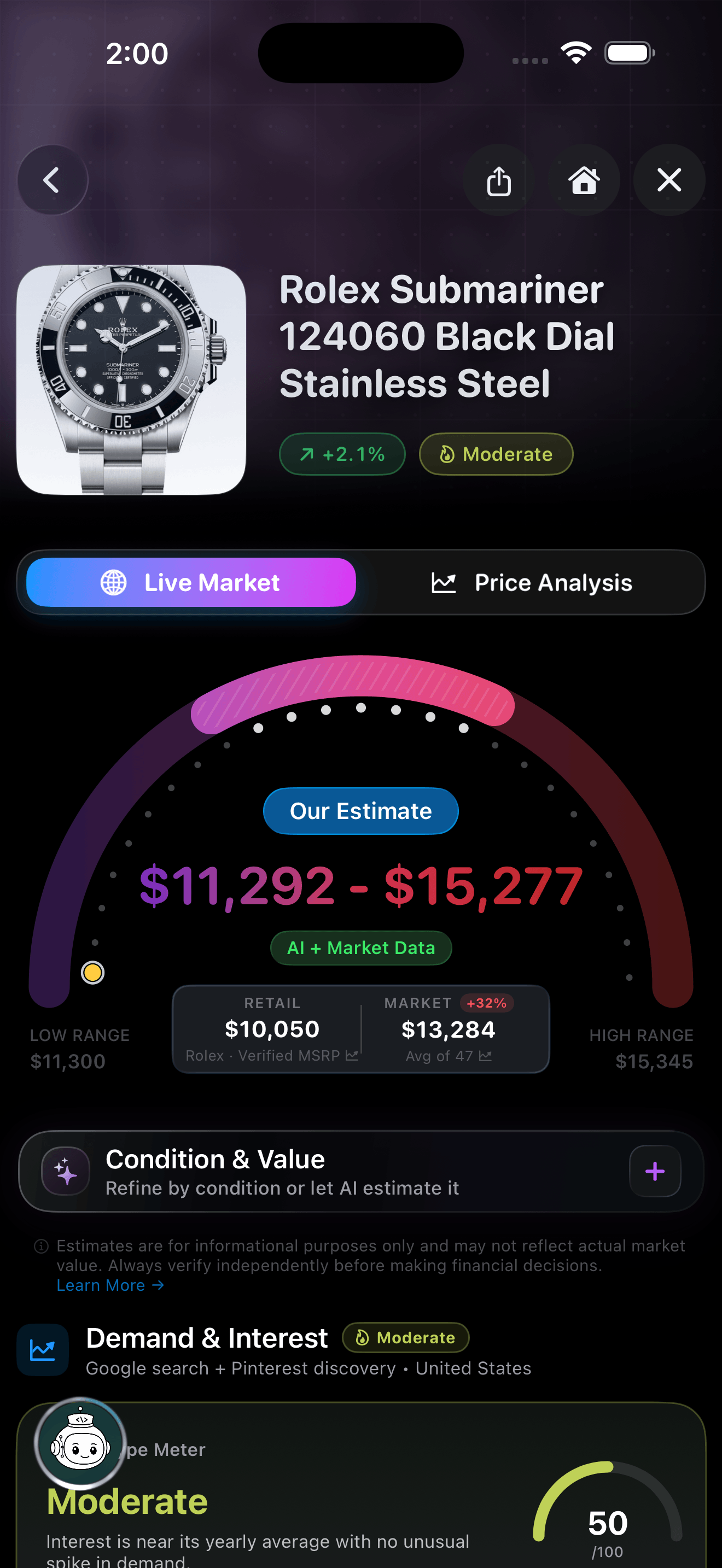
Rolex Submariner No-Date 124060
01 / RETAIL & RESALE
Rolex’s retail price is $10,050. On the market it averages $13,284, based on 47 prices. Pick its condition to adjust the $11,292–$15,277 estimate.
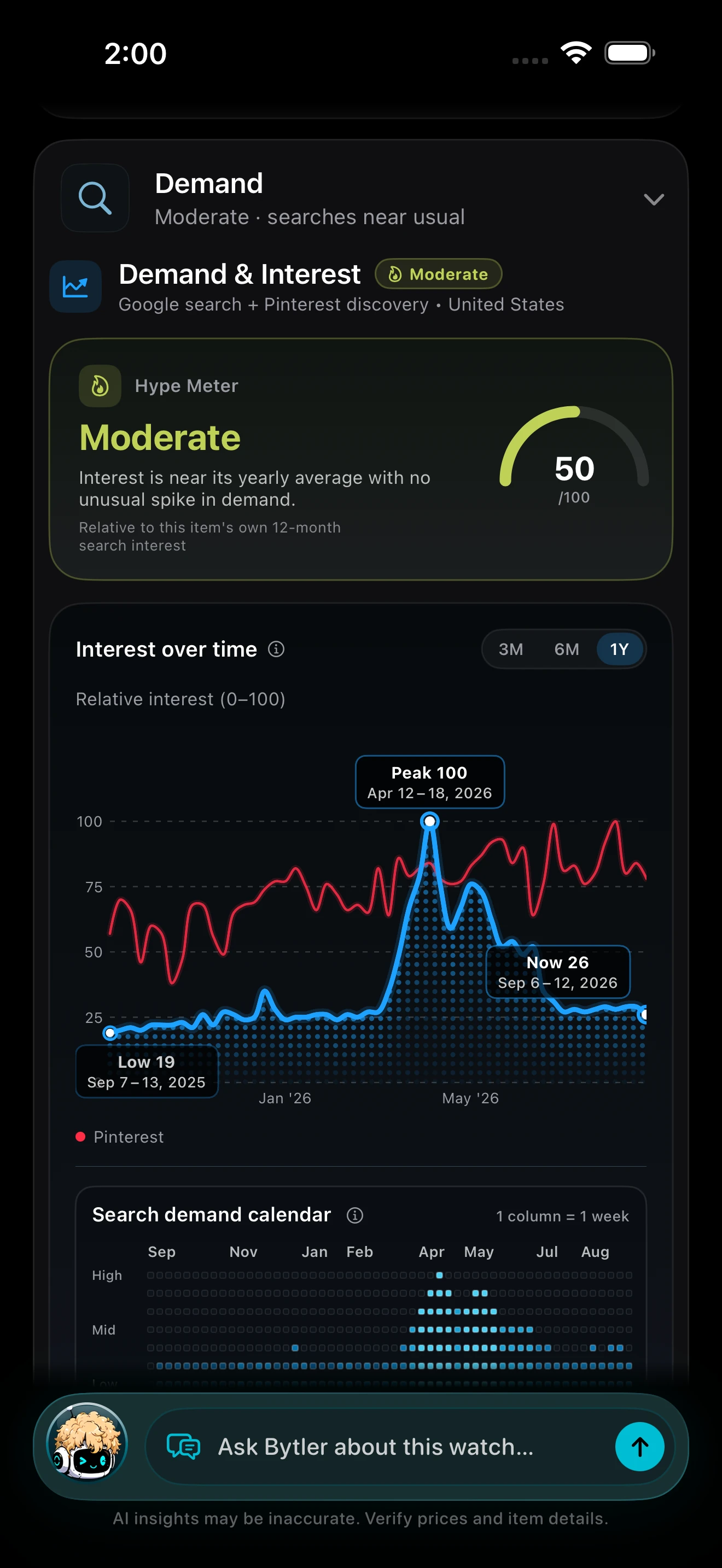
02 / DEMAND & INTEREST
See how much people have searched for this item each week over the past year. Busy weeks and quiet ones stand out at a glance.
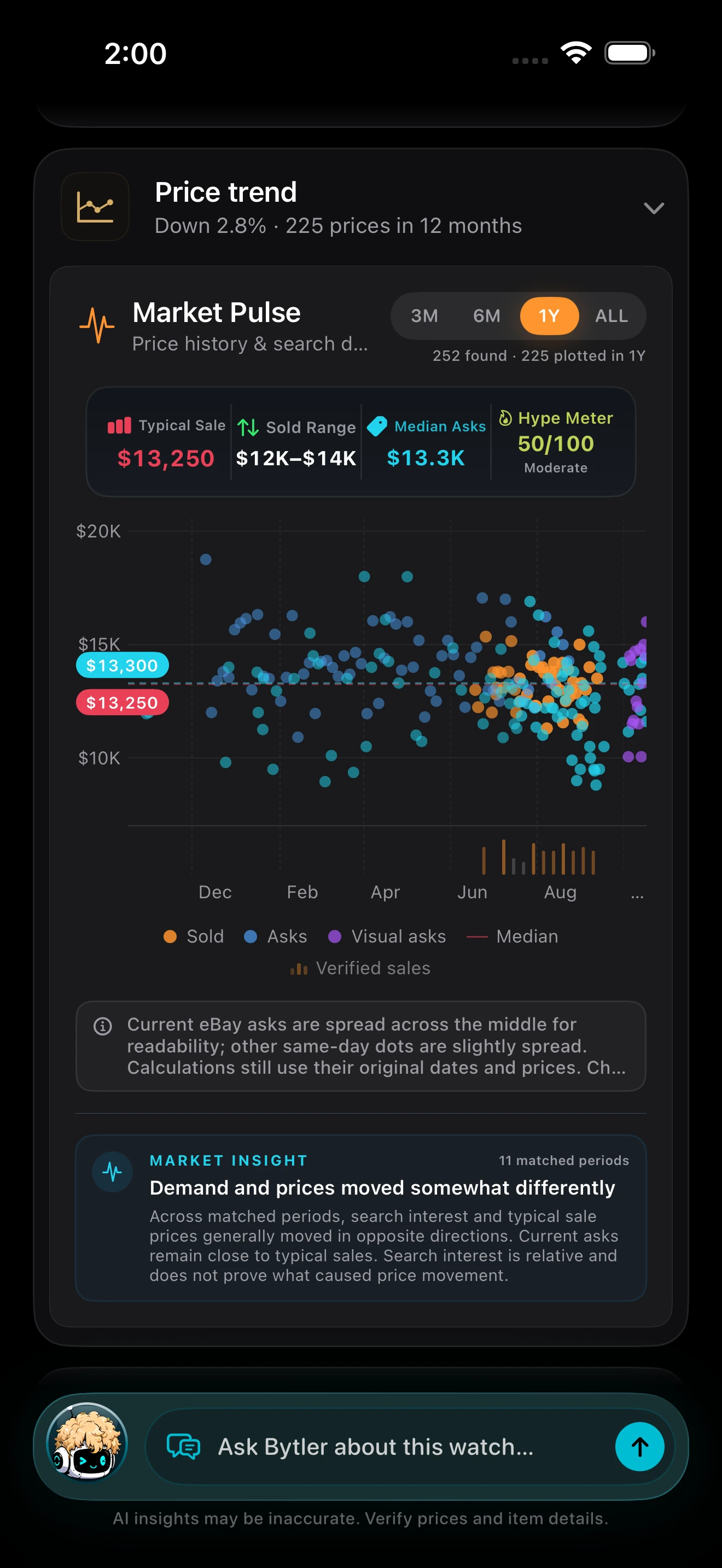
03 / MARKET PULSE
Each dot is a sale or a listing from the past year. See what buyers typically paid next to what sellers are asking now.
Scanned September 2026. Prices and available information vary by item.
03 / HOW IT WORKS
STEP 01
Snap a photo. Appraiso identifies the item, brand, model, reference, and category — then lets you focus on the exact object you want valued.
STEP 02
Get a price range built from what similar items actually sold for, what sellers are asking now, and the store price when there is one.
STEP 03
See whether recent sale prices are rising or cooling, what reviewers are saying, and which sources back the number.
STEP 04
Keep scans in your history and share a web report with price history, recent sales, source links, and a QR code that opens it in the app.
Know what it’s worth. Before you buy it, sell it, or walk away.
04 / MEET BYTLER
Meet Bytler, Appraiso’s AI shopping assistant. Ask what an item is worth, whether it’s a good buy, or where to find a better deal. It uses your scan report and web research to help you decide.
01 / ASK IF A PRICE IS FAIR
“Is $2,300 a fair price?” Get a clear take, then see how the asking price compares with recent sales and the item’s condition. Bytler starts with your scan report and can research reviews when you need more context.
PRICE CHECK · RECENT SALES · CONDITION
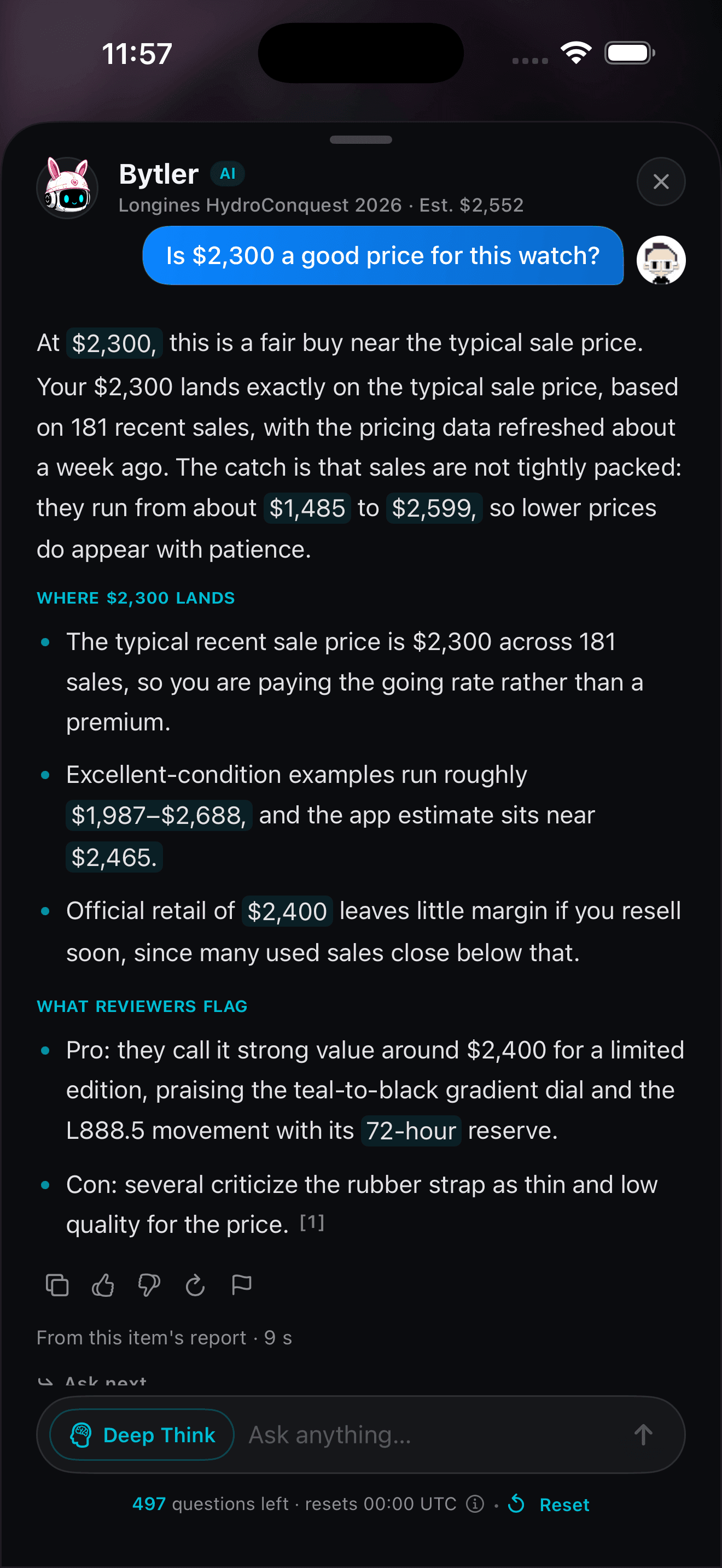
SCREENSHOTS CAPTURED IN THE APP · PRICES SHOWN MAY CHANGE
05 / WHY BYTLER
Take a photo. Bytler helps you understand the item, compare prices, and see where its web answers come from.
01 / START WITH A PHOTO
Appraiso identifies your item. Bytler uses the report to answer your questions.
02 / COMPARE PRICES
See what similar items sold for. Compare that with what sellers and stores are charging, when available.
03 / CHECK THE SOURCES
Bytler’s web answers link to the websites it uses, so you can check them yourself.
06 / COMPARE
Everything Appraiso combines is publicly available — the difference is one photo assembling it all, with the sources attached.
| CAPABILITY | APPRAISO | IMAGE SEARCH APPS | SEARCHING SOLD LISTINGS |
|---|---|---|---|
| Identify an item from one photo | Included | Included | Not available |
| Sold prices — what buyers actually paid | Included | Not available | Included |
| Current asking prices across marketplaces | Included | Partially available | Not available |
| A market-backed range, not one blind number | Included | Not available | Not available |
| Price history & trend direction | Included | Not available | Not available |
| Graded card values · PSA, BGS, CGC & more | Included | Not available | Not available |
| What owners and reviewers say | Included | Not available | Not available |
| Saved history & shareable reports | Included | Not available | Not available |
| Time to a usable answer | ONE SCAN | SEVERAL SEARCHES | BY HAND |
07 / COVERAGE
30+ item categories, built for resellers, collectors, and bargain hunters. Results adapt to what you're scanning.
01
Price inventory on the spot at estate sales, thrift stores, and flea markets. See what similar items sold for and what sellers are asking before you list.
02
Watches, bags, figures, sneakers, trading cards, vintage electronics — scan to see the exact version, its price range, and where the numbers come from.
03
Found something at Goodwill or a garage sale? Scan it before you buy and compare against recent sales and current listings.
04
Curious about something you already own, like an inherited watch, a gift, or an old camera? Take a photo to see what it is, what similar items sold for, and ask Bytler about it.
08 / FAQ
Appraiso is coming soon to iPhone. Join the launch list and we’ll send you one email when it launches. No marketing emails.
Bytler is Appraiso’s AI shopping assistant, built into your scan report. Ask whether a price is fair, what an item sells for used, what owners think, or where to find deals. It starts with your report and can research the web for more context. Ask a follow-up or return to the saved conversation later.
Yes — Appraiso does exactly that. Snap a photo of any item and the app identifies it using AI, then combines recent sales, current listings, visual matches, and store prices into a price range. Works across 30+ categories including electronics, sneakers, watches, collectibles, and more.
Results start appearing within seconds and the full report fills in as sources report back. Appraiso gathers identification, recent sales, current listings, and visual matches all at once, and many market lookups are cached, so repeat items load faster.
Appraiso combines AI item recognition with real sold prices, current marketplace listings, visual matches, store prices, and community discussion and video coverage. Each report shows the sales and listings behind its number.
Yes. Switch to barcode mode and point at a UPC barcode. The app looks it up in a UPC database and, when found, pulls details, images, and pricing — no photo needed.
Appraiso supports 30+ categories including electronics, sneakers, clothing, luxury bags, watches, trading cards, toys, sporting goods, furniture, art, jewelry, and more. Results adapt to each category — watches get specialist market coverage, products get retail anchors, and collectibles get visual matches and sold comps.
Yes. When you scan a trading card, the Trading Card Hub opens automatically — no separate mode to pick. Appraiso identifies the exact card, set, and card number using set-aware matching, then returns the market price by condition (Near Mint through Damaged), a graded value ladder across PSA, BGS, CGC, SGC, and TAG when available, price history you can flip between 7-day, 30-day, 90-day, and 1-year views, and recent sold averages as corroborating evidence. It supports 8 games: Pokémon, Magic: The Gathering, Yu-Gi-Oh!, Lorcana, One Piece, Star Wars: Unlimited, Digimon, and Flesh and Blood.
Yes. Appraiso can create a polished web report with the item image, price range, price history, community insight, similar items, live listings, sold data, and a QR code that opens the result in the app.
No. Appraiso provides market-based pricing guidance, not certified appraisals. Use it for quick estimates when listing, buying, or selling. Final value depends on timing, condition, and buyer demand.
When Appraiso launches, you’ll get 3 free scans to try it. Appraiso Premium removes the scan limit and gives you 50 Bytler questions a day.